Ditching Long-Lived Access Keys: How I Switched to Temporary Credentials (and What Broke)
Everybody agrees that static access keys are a bad idea. Almost nobody tells you what the switch actually feels like, which is a series of small, irritating error messages that make you want to paste the old key back in “just for now”.
I know that feeling, because I tried the switch in a lab and hit four separate walls before the temporary credentials worked. The short answer to “how do I replace static keys” is: give the workload a role, let it request short-lived credentials, remove the old key from every place it lives, and only then delete it. The details, and the parts that broke, are below.
Limits first: I ran this in a lab against moto, which is a mock of AWS that runs on my own machine, not against a real AWS account. The mock behaves like AWS in the ways that matter here, but error wording and some edge cases differ, and I haven’t tested any of this in production. The CI/CD part of this post comes from vendor documentation, not from my own run.
Why bother with temporary credentials
A static access key is a permanent password for a machine. It does not expire, it works from anywhere, and it tends to get copied into scripts, config files and chat messages. AWS’s own documentation says to use temporary credentials, such as those from IAM roles, instead of long-term access keys wherever you can. You can read their wording in AWS’s page on managing access keys for IAM users.
Temporary credentials fix the worst part of a leak. If one escapes, it stops working when it expires. If you want to see how keys escape in the first place, I scanned a test repo for planted fake ones in Why Stolen Cloud Credentials Beat Software Bugs.
The lab: one user, one role, one bucket
My setup was deliberately small:
- A bucket for report files.
- An IAM user with a static access key and permission to read and write that one bucket (the “before” picture).
- A role with the same bucket permissions, which the user is allowed to assume (the “after” picture).
- A second role with no permissions at all, to see what a missing policy looks like.
In the mock, I turned on permission checking, so each request was judged against the real policies instead of being waved through. Without that, nothing would have broken, and I would have learned nothing.
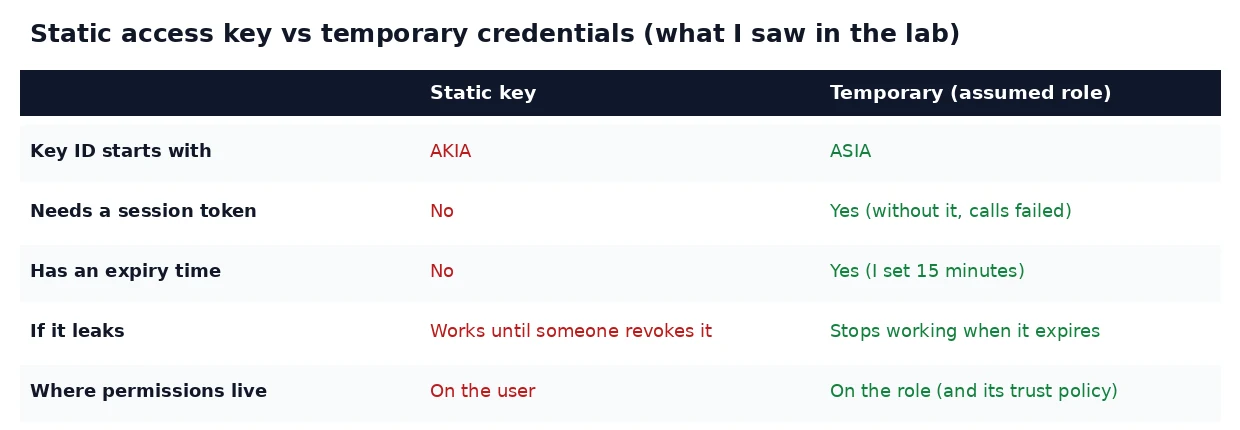
The first difference showed up before I touched a single permission. The static key’s ID started with AKIA. Credentials issued by assuming a role started with ASIA, and came with a session token and an expiry time. That prefix is a handy way to tell the two kinds apart when you’re digging through logs or config.
What broke on the way
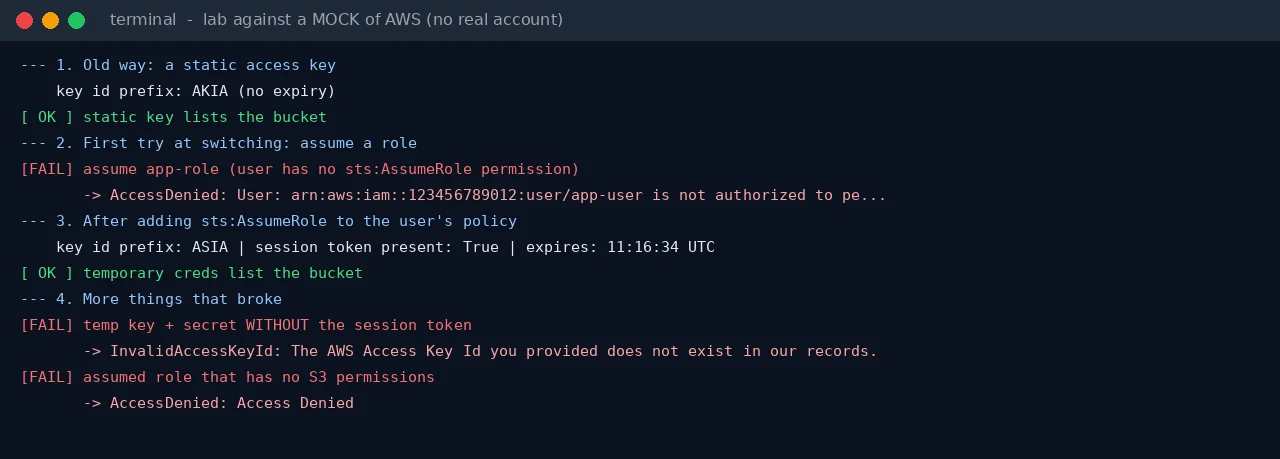
Here is the actual output from my lab.
Break 1: “Not authorized to perform sts:AssumeRole”
My first attempt to assume the role failed straight away with an access-denied error. The user had permission to use S3 but no permission to assume the role. Once I added an sts:AssumeRole statement to the user’s policy, scoped to the two roles, it worked.
A caveat here: AWS evaluates role assumption using both the role’s trust policy and the caller’s own permissions, and the exact rules differ a little depending on whether the caller is in the same account. I only saw this behaviour in the mock, so check the AWS documentation for your own case before assuming it matches.
Break 2: Credentials that “don’t exist”
Temporary credentials have three parts: a key ID, a secret and a session token. When I used the key ID and secret without the token, the call failed with an invalid-key error. The key ID alone is meaningless without the token that goes with it. The error message sent me looking for a missing key when the real problem was a missing token, and I’d guess this one wastes the most time in real migrations.
The fix is to stop handling the pieces by hand. If you let the SDK find credentials on its own, it carries the token for you.
Break 3: The role that can do nothing
I assumed the second role, the one with no permissions, and tried to list the bucket. Access denied. This is the correct result, and it is also the most common “it doesn’t work” cause in real life: creating the role and the trust policy, but forgetting the permissions policy. Assuming a role successfully only proves the trust relationship works. What the role can do is a separate question.
Break 4: The old key that wouldn’t go away
This one wasn’t an error message. It was worse, because everything seemed to work. I wrote a small script that asks the AWS SDK for Python which credentials it would pick, using fake local files and no real calls.
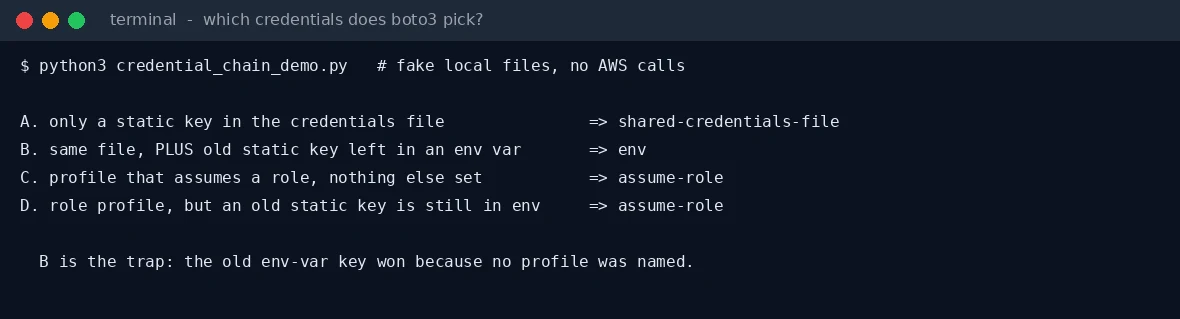
The result that matters is case B. I had a static key in the credentials file, and an old static key left in an environment variable. With no profile named, the environment variable won. If I had thought I’d moved to roles but an old variable was still sitting in my shell, my code would have kept using the old key without telling me. In case D, naming a role profile explicitly took precedence over the leftover variable, so being explicit helps.
The lesson is that switching to roles is not finished until you’ve hunted down every place the old key lives: environment variables, credentials files, CI settings, and old config in scripts.
How I’d do the switch in a real project
If you’re doing this for real, this is the order I’d follow:
- List where static keys are used. For each key, note which app, which person or which pipeline uses it. A key nobody can explain is a candidate to deactivate.
- Pick the right replacement for the workload. Code running on AWS compute can use a role attached to the instance, task or function, with no key at all. People working locally can sign in through a central login and assume a role for the session. CI/CD pipelines can use short-lived tokens through identity federation, covered in the next section.
- Create the role with the right trust and permissions. Remember both halves: who may assume it, and what it may do. Keep the permissions narrow, as in my IAM least-privilege walkthrough.
- Remove hardcoded credentials from the code. Let the SDK’s default lookup find them instead.
- Clear every old copy. Environment variables, credentials files, secrets stored in pipelines.
- Test with the old key disabled. I would deactivate before deleting, so you can switch it back on if something breaks.
- Delete the old key once everything has run cleanly for a while.
The CI/CD version: workload identity
Pipelines are where long-lived keys pile up, because a deployment job needs access and somebody pasted a key into a secret store years ago. The alternative is identity federation. Instead of storing a key, the pipeline proves who it is using a short-lived token from its platform, and the cloud provider swaps that token for temporary credentials.
GitHub documents this for AWS in its guide to configuring OpenID Connect in Amazon Web Services. In my own words: you register GitHub as a trusted identity provider, create a role whose trust policy names the repository (and optionally the branch or environment) allowed to use it, and the workflow requests credentials at run time. The guide stresses adding conditions to the trust policy so that untrusted repositories can’t request access.
I haven’t built this end to end, so treat that as a summary of the documentation, not a tested recipe. If you try it, the trust condition is the part I would double-check.
Mistakes I’d avoid
- Forgetting the permissions policy. A role with a good trust policy and no permissions can assume fine and do nothing.
- Making the trust policy too broad. If any identity can assume the role, you’ve traded a leaked key for an open door.
- Leaving the old key in the environment. My lab showed it silently winning.
- Handling session tokens by hand. Let the SDK manage them.
- Deleting the old key first. Deactivate, test, then delete.
- Setting very short lifetimes without refresh handling. Temporary credentials expire by design. Long-running jobs need code that refreshes them, which SDK role providers do for you, but custom scripts may not.
- Calling it done after one test. Check the logs and the config for anything still using the old key.
Where I’d go from here
The unexpected part of this exercise was that the technical change is small and the cleanup is the hard part. Creating a role took a few lines. Finding every place the old key lived was the real work, and the credential-order demo showed how easily one forgotten variable can undo all of it.
I’m confident about the order of steps and the failure modes, because I saw them. I’m less sure how it feels at scale, with dozens of services and a pipeline nobody wants to touch, since my lab had one user and two roles. If you try this, start with the least critical workload, keep the old key deactivated but not deleted until you’re sure, and check the logs for anything still using it.
Want to try it yourself? Download the sample file invoice-lab.eml. Open it in a text editor to read the headers, and in a mail client to see the rendered view.
Want to run the test yourself? Download dlp_test.py and run it with python3 dlp_test.py. Everything in it is made-up or documentation-example data.
Want to run the lab yourself? Download the lab files. They only read local JSON files and never connect to AWS.
*Want to repeat the experiment? Download setup_lab_repo.sh and scan_commands.txt. The script builds a throwaway repo containing only fake secrets.*s