A storage bucket becomes public in about the time it takes to paste one JSON statement, and it can stay public for years because nothing visibly breaks. That’s the whole problem. This post walks through exactly how it happens, using a test bucket, and then shows the four Block Public Access settings that shut it down, including the part nobody warned me about: turning them on doesn’t remove the bad policy.
Starting with a boring, private bucket
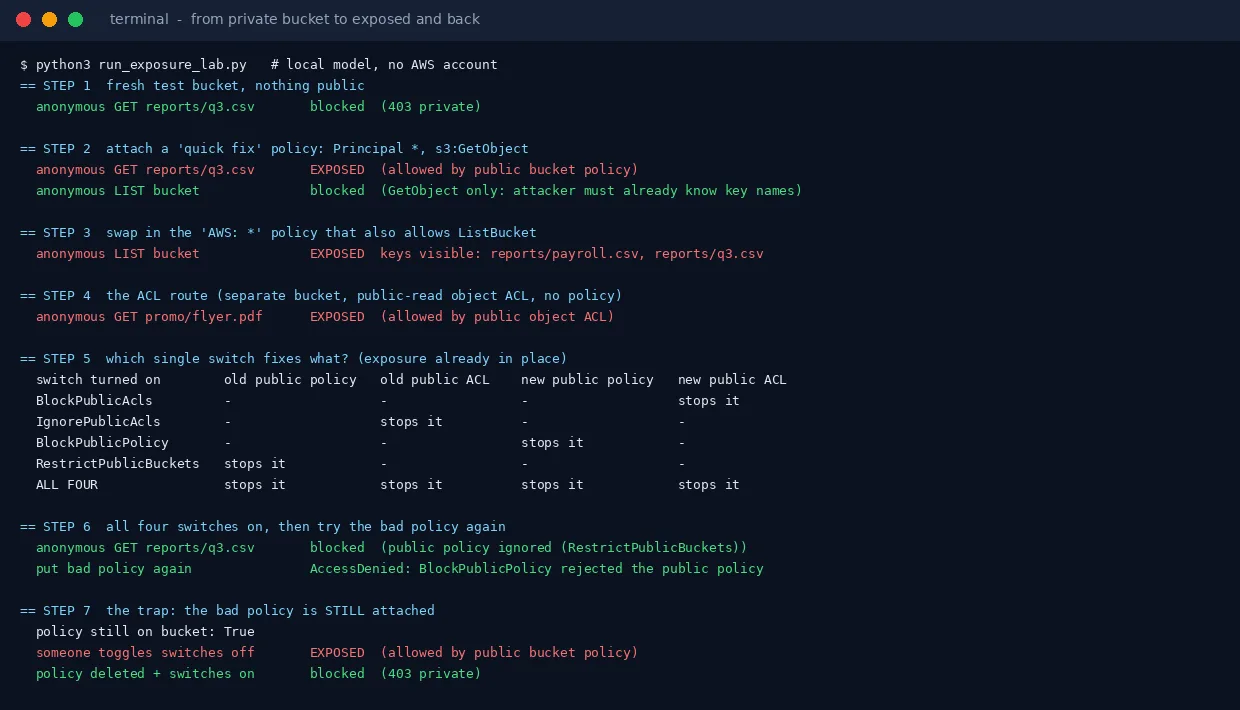
I wanted to do this the slow way, one change at a time, so I started with a bucket called lab-exposure-test holding two files: reports/q3.csv and reports/payroll.csv. Nothing public, no policy. An anonymous request for q3.csv came back blocked, which is what you’d expect from a private bucket.
One honest note before going further. I ran this in a small local model I wrote, not on a live AWS account. It follows the behavior AWS documents for bucket policies, ACLs and the four Block Public Access settings, but it’s still my model of S3, not S3. Where I give commands for a real bucket further down, I haven’t run them for this post, so try them on a throwaway bucket first.
One policy, and it’s public
Here’s the kind of “quick fix” I planted. Somebody needs a colleague or a client to open a file, the share link isn’t working, and a policy like this feels like the shortest path:
{
  "Effect": "Allow",
  "Principal": "*",
  "Action": "s3:GetObject",
  "Resource": "arn:aws:s3:::lab-exposure-test/*"
}
The "Principal": "*" is the whole story. It means everyone, including people who aren’t signed in to anything. After attaching it, the anonymous request for q3.csv flipped to exposed.
What I didn’t appreciate before trying it: GetObject alone lets anyone fetch a file only if they know or guess the exact key. Listing the bucket stayed blocked. That’s a thin kind of safety, and it disappears the moment someone adds s3:ListBucket, which I did next. With listing allowed, an anonymous request returned both file names, payroll.csv included. Guessing was no longer needed.
The second way in: ACLs
Policies aren’t the only door. Older ACLs can mark a single object “public-read”, and in my second test bucket that alone exposed a flyer with no policy attached at all. If you’ve inherited an older bucket, check both places. The newer default is to turn ACLs off entirely, and AWS describes this under object ownership, but older buckets and some infrastructure templates may not have it.
The four switches nobody explains properly
Block Public Access is four separate settings, and I assumed for a long time that they were four strengths of the same thing. They aren’t. Each one does a different job:
- BlockPublicAcls rejects new public ACLs.
- IgnorePublicAcls makes S3 ignore public ACLs that already exist.
- BlockPublicPolicy rejects new public bucket policies.
- RestrictPublicBuckets neutralizes a public policy that’s already attached.
I tested each one alone against an exposure that was already in place, then against a new attempt to create one:
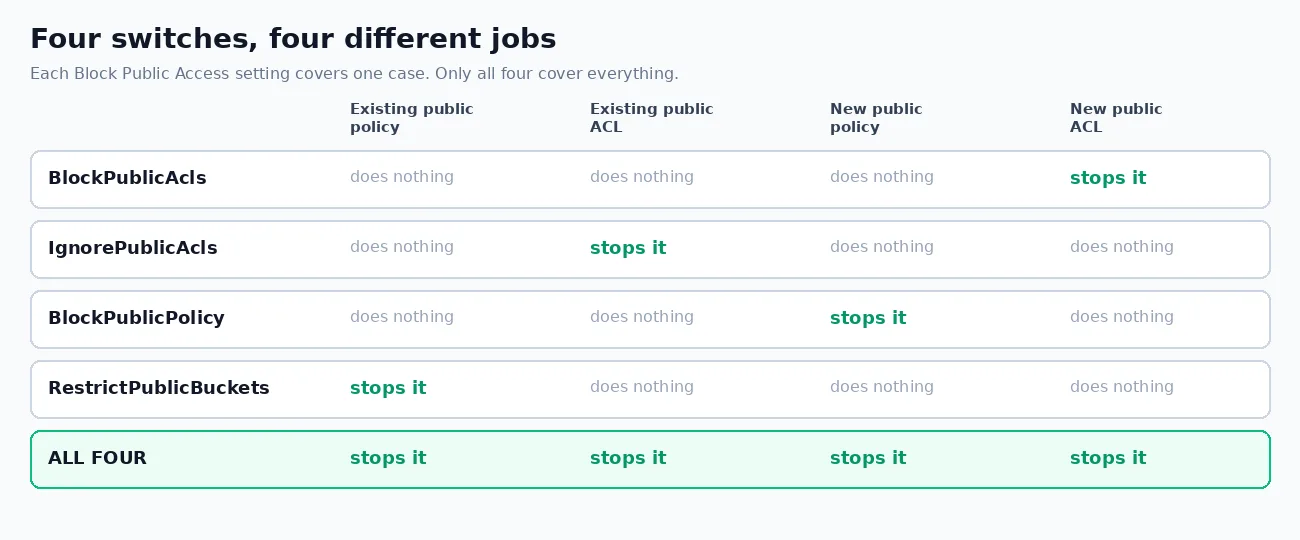
The result that changed how I think about it: BlockPublicPolicy did nothing to the policy that was already there. It only stops the next one. If you turn on just that setting on a bucket that’s already exposed, it stays exposed. The one that closes an existing policy is RestrictPublicBuckets, and the one that closes an existing ACL is IgnorePublicAcls. Only all four together cover every case.
Locking it down, in the order that worked
With all four settings on, the anonymous request was blocked, and my attempt to re-attach the bad policy was rejected outright. That’s the behavior you want: not just closed today, but unable to be re-opened by accident.
The commands I’d use on a real throwaway bucket (untested by me for this post, so start with a test bucket and your own region):
# turn on all four settings
aws s3api put-public-access-block --bucket YOUR-TEST-BUCKET \
  --public-access-block-configuration \
  BlockPublicAcls=true,IgnorePublicAcls=true,BlockPublicPolicy=true,RestrictPublicBuckets=true

# check what's actually set
aws s3api get-public-access-block --bucket YOUR-TEST-BUCKET

# look at what policy is still attached
aws s3api get-bucket-policy --bucket YOUR-TEST-BUCKET
Then give people access the right way: presigned links for one-off sharing, or CloudFront in front of the bucket for public content. If a public website is the point of the bucket, that’s a deliberate exception, and I’d keep it in its own bucket with nothing sensitive in it. For anything granting access to named people, my IAM least-privilege article covers how to scope it, and AWS’s S3 security best practices are worth a skim.
The two things that tripped me up
My first check missed a public policy. I wrote a quick test for “is this policy public?” that looked for "Principal": "*". It caught my first policy and passed my second one as private. The second used "Principal": {"AWS": "*"}, which means the same thing, and it was the one that allowed listing.
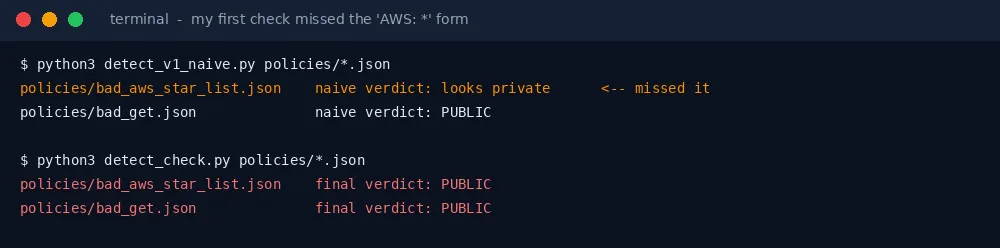
I fixed it to recognize both forms. The takeaway is that “everyone” can be written more than one way, so a check that matches a single string is a false sense of safety. My model also only flags unconditional statements, so a policy with conditions, like restricting to an IP range, needs a human to read it.
The bad policy was still sitting there. After turning all four settings on, I checked and the policy was still attached. The bucket was safe only because of the settings. When I switched them off in the model, which is something a well-meaning cleanup or a template redeploy could do, it was exposed again instantly. Safe-because-of-a-switch is fragile. The real fix is both: switches on, and the bad policy deleted. After I removed it and kept the settings on, the bucket stayed private.
Other mistakes worth avoiding, from this exercise:
- Assuming one Block Public Access setting is “the” setting.
- Fixing the bucket and forgetting object ACLs.
- Removing public access without checking what depended on it. Somebody’s link will break.
- Leaving a plain-text password or key in a file in the bucket, which turns a leak into a breach. I wrote about that in Why Stolen Cloud Credentials Beat Software Bugs.
What I’d do before closing the tab
If you only have ten minutes, check three things on every bucket you own: are all four settings on, is any policy still attached with * as the principal, and do any objects carry a public ACL. That’s the entire audit, and it’s enough to catch every case in this post.
I covered a wider set of cloud mistakes in the vulnerable lab post, and if you’d rather move away from long-lived keys altogether, Ditching Long-Lived Access Keys is the place to go next. Bucket exposure isn’t glamorous, but it’s one of the cheapest things to fix once you know where to look.
The lab files, images and commands are in the zip with this post. Everything in the model runs locally, and nothing in it connects to AWS.