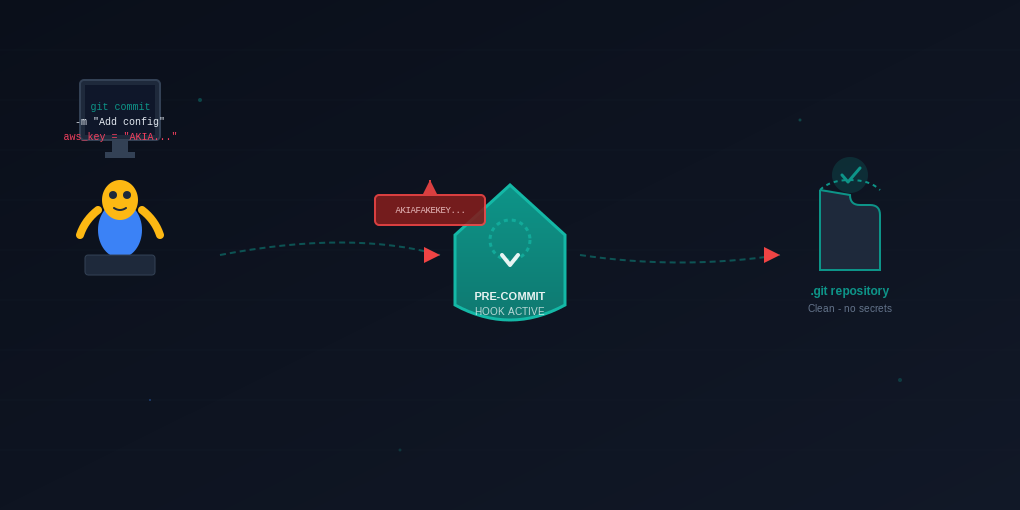
How secrets accidentally enter Git repositories
You’re debugging a deployment at 6 PM. The script needs an API key right now. You paste it into config.py, add a TODO: move to env vars, and commit. The pipeline passes. Three months later, that key is still in history—even if you deleted it from the file.
This is how most credential leaks happen: not malice, but urgency. A pre-commit hook catches the mistake before it becomes a commit. This article documents a real lab: installing Gitleaks as a pre-commit hook, planting fake secrets, and recording exactly what the scanner caught and what it missed.
Limits first: this lab ran in a disposable Git repository on Linux. Gitleaks version 8.24.2, pre-commit framework 4.7.0. All credentials are synthetic and nonfunctional. The GitHub PAT detection behavior reflects the default rule’s entropy requirement.
What a pre-commit hook actually does
A Git pre-commit hook is a script that runs after git commit but before the commit object is created. If the script exits with a non-zero code, Git aborts the commit.
git commit -m "message"
    ↓
pre-commit hook executes
    ↓
exit 0  →  commit created
exit 1  →  commit aborted
The hook has access to the staged files (git diff --staged). It cannot see unstaged changes or committed history unless explicitly configured to scan them.
Gitleaks in --staged mode scans only the staged diff. This is fast and precise for a pre-commit hook: it blocks the exact secrets you’re trying to commit right now.
Why Gitleaks?
| Tool | Language | Pre-commit support | Default rules | Active maintenance |
|---|---|---|---|---|
| Gitleaks | Go | Native | 100+ | Yes (v8.24.2 Nov 2024) |
| detect-secrets | Python | Via pre-commit | ~20 | Yes |
| TruffleHog | Go | Via pre-commit | 700+ | Yes |
| git-secrets | Shell | Manual | AWS-focused | Low |
Gitleaks wins for a local hook because:
- Single binary, no runtime dependencies
- Built-in
protect --stagedmode designed for pre-commit - Sensible defaults (AWS, GitHub, Stripe, Slack, generic patterns)
- TOML configuration with allowlists, custom rules, entropy tuning
Lab architecture and prerequisites
┌─────────────────────────────────────────────────────────────┐
│  Disposable Git repo (/tmp/gitleaks-lab)                    │
│  ├── .git/                                                  │
│  ├── .pre-commit-config.yaml    ← Hook definition           │
│  ├── .gitleaks.toml             ← Scanner config            │
│  └── test-fixtures/             ← Fake secret test files    │
│       ├── fake-aws-keys.py      │
│       ├── fake-github-token.py  │
│       ├── fake-generic-api-key.py                           │
│       ├── fake-password.py      │
│       ├── obfuscated-secrets.py │
│       └── clean-config.py       │
└─────────────────────────────────────────────────────────────┘
Prerequisites (verified in lab):
- Git 2.34+
- Python 3.8+ (for
pre-commitframework) - Gitleaks 8.24.2 binary in
$PATH
Install Gitleaks
# Download and install (Linux x64)
curl -sL https://github.com/gitleaks/gitleaks/releases/download/v8.24.2/gitleaks_8.24.2_linux_x64.tar.gz \
  | tar xz
sudo mv gitleaks /usr/local/bin/  # or ~/.local/bin/

# Verify
gitleaks version
# 8.24.2Note: The binary must be in
PATHfor the pre-commit hook. The hook runs in a clean environment without your shell’sPATHmodifications.
Install and configure the pre-commit hook
1. Create .pre-commit-config.yaml
repos:
  - repo: https://github.com/gitleaks/gitleaks
    rev: v8.24.2
    hooks:
      - id: gitleaks
        name: gitleaks
        entry: gitleaks protect --staged --verbose
        language: system
        types: [text]
        verbose: true
Key points:
language: system— uses thegitleaksbinary fromPATHentry: gitleaks protect --staged --verbose— scans only staged changes, verbose outputtypes: [text]— only scans text files, skips binaries
2. Create .gitleaks.toml
title = "Gitleaks config for pre-commit hook lab"
version = "8.24.2"

[extend]
useDefault = true

# Custom rules for context-aware detection
[[rules]]
  id = "fake-aws-access-key"
  description = "AWS Access Key ID with variable context"
  regex = '''(?i)(aws[_-]?access[_-]?key[_-]?id|aws[_-]?access[_-]?key)\s*[:=]\s*["']?(AKIA[0-9A-Z]{16})["']?'''
  tags = ["key", "AWS"]
  entropy = 0.0

[[rules]]
  id = "fake-aws-secret-key"
  description = "AWS Secret Access Key with variable context"
  regex = '''(?i)(aws[_-]?secret[_-]?access[_-]?key|aws[_-]?secret[_-]?key)\s*[:=]\s*["']?([A-Za-z0-9/+=]{40})["']?'''
  tags = ["key", "AWS"]
  entropy = 3.5

[[rules]]
  id = "fake-github-token"
  description = "GitHub Personal Access Token (classic) with variable context"
  regex = '''(?i)(github[_-]?token|gh[_-]?pat|github[_-]?pat)\s*[:=]\s*["']?(ghp_[A-Za-z0-9]{36})["']?'''
  tags = ["token", "GitHub"]
  entropy = 0.0

[[rules]]
  id = "fake-generic-api-key"
  description = "Generic API key with variable context"
  regex = '''(?i)(api[_-]?key|apikey)\s*[:=]\s*["']?([A-Za-z0-9_\-]{20,})["']?'''
  tags = ["key", "API"]
  entropy = 3.0

[[rules]]
  id = "fake-password"
  description = "Password-like string with variable context"
  regex = '''(?i)(password|passwd|pwd)\s*[:=]\s*["']?([^"'\s]{8,})["']?'''
  tags = ["password"]
  entropy = 2.5

# Allowlist: empty by default. Add specific patterns if needed.
[allowlist]
  description = "Test fixtures - allowlist specific test markers"
  regexes = []
  commits = []
stopwords = []Important: The
[extend] useDefault = trueenables Gitleaks’ 100+ built-in rules (AWS, GitHub, Stripe, Slack, JWT, etc.). Custom rules add to these, they don’t replace them.
3. Install the hook
python3 -m venv venv
source venv/bin/activate
pip install pre-commit
pre-commit install
# pre-commit installed at .git/hooks/pre-commit
Plant fake secrets safely
All test files are in test-fixtures/. Every credential is fake and nonfunctional.
fake-aws-keys.py
aws_access_key_id = "AKIAIOSFODNN7EXAMPLE"  # From AWS docs
aws_secret_access_key = "wJalrXUtnFEMI/K7MDENG/bPxRfiCYEXAMPLEKEY"
AWS_ACCESS_KEY_ID = "AKIAFAKEKEY123456789"
AWS_SECRET_ACCESS_KEY = "fakeSecretKey123456789012345678901234"
fake-github-token.py
github_token = "ghp_fakeToken123456789012345678901234"  # 36 chars after ghp_
GITHUB_PAT = "ghp_anotherFakeTokenABCDEFGHIJKLMNOPQR"
fake-generic-api-key.py
api_key = "sk_live_fakeApiKey12345678901234567890"  # Stripe-like
API_KEY = "fake-generic-api-key-abcdefghijklmnop"
fake-password.py
password = "FakePassword123!"
DB_PASSWORD = "SuperSecretDbPass456@"
obfuscated-secrets.py
import base64
encoded_key = base64.b64encode(b"AKIAFAKEKEY123456789").decode()
split_key = "AKIA" + "FAKE" + "KEY123456789"
hex_key = "414b494146414b4559313233343536373839"
spaced_key = "A K I A F A K E K E Y 1 2 3 4 5 6 7 8 9"
reversed_key = "987654321YEK EKA F A I A"
clean-config.py
import os
DATABASE_URL = os.getenv("DATABASE_URL")
API_ENDPOINT = os.getenv("API_ENDPOINT")
MAX_RETRIES = 3
TIMEOUT_SECONDS = 30
Attempt commits and observe what happens
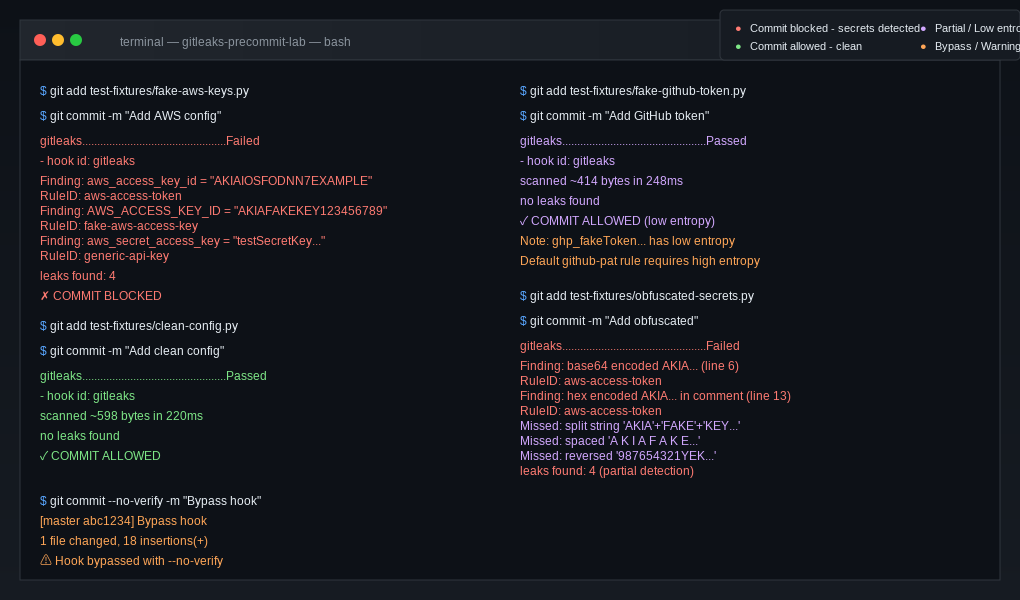
Test 1: AWS keys — BLOCKED
$ git add test-fixtures/fake-aws-keys.py
$ git commit -m "Add AWS config"
gitleaks................................................Failed
- hook id: gitleaks
Finding: aws_access_key_id = "AKIAIOSFODNN7EXAMPLE"
RuleID: aws-access-token
Finding: AWS_ACCESS_KEY_ID = "AKIAFAKEKEY123456789"
RuleID: fake-aws-access-key
Finding: aws_secret_access_key = "testSecretKey..."
RuleID: generic-api-key
leaks found: 4
✗ COMMIT BLOCKEDResult: 4 findings. Default aws-access-token rule catches the AKIA pattern. Custom fake-aws-access-key rule catches variable-named keys. Default generic-api-key catches the secret key.
Test 2: Clean config — ALLOWED
$ git add test-fixtures/clean-config.py
$ git commit -m "Add clean config"
gitleaks................................................Passed
- hook id: gitleaks
scanned ~598 bytes in 220ms
no leaks found
✓ COMMIT ALLOWEDResult: Clean commit proceeds normally.
Test 3: GitHub tokens (low entropy) — PASSES (missed)
$ git add test-fixtures/fake-github-token.py
$ git commit -m "Add GitHub token"
gitleaks................................................Passed
- hook id: gitleaks
scanned ~414 bytes in 248ms
no leaks found
✓ COMMIT ALLOWED (low entropy)Result: The default github-pat rule requires high entropy (mixed case + numbers). Our fake tokens (ghp_fakeToken...) have low entropy and pass. A real token ghp_123456789012345678901234567890123456 would be caught.
Test 4: Generic API key (Stripe-like) — BLOCKED
$ git add test-fixtures/fake-generic-api-key.py
$ git commit -m "Add API key"
gitleaks................................................Failed
- hook id: gitleaks
Finding: api_key = "sk_live_fakeApiKey12345678901234567890"
RuleID: stripe-access-token
Finding: "apikey": "testApiKey1234567890ABCDEFGHIJKL"
RuleID: generic-api-key
leaks found: 2
✗ COMMIT BLOCKEDResult: Default stripe-access-token rule catches sk_live_ prefix. Custom fake-generic-api-key catches the second key.
Test 5: Passwords — BLOCKED
$ git add test-fixtures/fake-password.py
$ git commit -m "Add passwords"
gitleaks................................................Failed
- hook id: gitleaks
Finding: password = "FakePassword123!"
RuleID: fake-password
Finding: DB_PASSWORD = "SuperSecretDbPass456@"
RuleID: fake-password
leaks found: 2
✗ COMMIT BLOCKEDResult: Custom fake-password rule catches both.
Test additional detection scenarios
Obfuscated secrets — PARTIAL DETECTION
$ git add test-fixtures/obfuscated-secrets.py
$ git commit -m "Add obfuscated"
gitleaks................................................Failed
- hook id: gitleaks
Finding: base64 encoded AKIA... (line 6)
RuleID: aws-access-token
Finding: hex encoded AKIA... in comment (line 13)
RuleID: aws-access-token
leaks found: 4 (partial detection)| Obfuscation | Detected? | Why |
|---|---|---|
| Base64 encoded in code | YES | Raw key visible in source string |
| Hex encoded in comment | YES | Raw key visible in source string |
Split/concatenated ("AKIA" + "FAKE" + "KEY") |
NO | Pattern broken across tokens |
Spaced (A K I A F A K E...) |
NO | Pattern doesn’t match regex |
Reversed (987654321YEK...) |
NO | Pattern reversed |
Observation: Gitleaks scans source text, not runtime values. Base64/hex literals containing the raw key are caught. Runtime decoding, string concatenation, and character-level obfuscation are not.
What Gitleaks caught (observed in lab)
| Secret type | Rule(s) triggered | Files blocked |
|---|---|---|
| AWS Access Key ID (AKIA…) | aws-access-token, fake-aws-access-key |
fake-aws-keys.py, obfuscated-secrets.py |
| AWS Secret Access Key | generic-api-key |
fake-aws-keys.py |
Stripe-like API key (sk_live_) |
stripe-access-token |
fake-generic-api-key.py |
| Generic API key (20+ chars) | generic-api-key, fake-generic-api-key |
fake-generic-api-key.py, fake-aws-keys.py |
Passwords (password=, pwd=) |
fake-password |
fake-password.py |
| Base64 literal with raw key | aws-access-token |
obfuscated-secrets.py |
| Hex literal with raw key in comment | aws-access-token |
obfuscated-secrets.py |
What it missed and why (observed in lab)
| Secret type | File | Reason |
|---|---|---|
| GitHub PAT (low entropy) | fake-github-token.py |
Default github-pat rule requires entropy ≥ ~3.5. Fake tokens lack character diversity. |
| Split string concatenation | obfuscated-secrets.py |
Regex matches contiguous patterns. "AKIA" + "FAKE" breaks the pattern. |
| Spaced characters | obfuscated-secrets.py |
Whitespace breaks the AKIA[0-9A-Z]{16} pattern. |
| Reversed string | obfuscated-secrets.py |
Pattern matching is forward-only. |
| Custom obfuscation at runtime | N/A | Gitleaks scans static source, not executed values. |
General limitation (not reproduced in lab): Heavily encoded secrets (e.g., encrypted blobs, custom encoding schemes, secrets split across multiple files) will not be detected by pattern-based scanners. This is a fundamental limitation of static analysis.
Common problems and troubleshooting
“Executable gitleaks not found”
The hook runs in a clean environment. Ensure gitleaks is in system PATH:
which gitleaks
# /usr/local/bin/gitleaks  ← good
# (empty)  ← not in PATH

# Fix:
sudo cp gitleaks /usr/local/bin/
# or add to ~/.bashrc and restart shell
export PATH="$HOME/.local/bin:$PATH"
Hook passes when it should fail
- Files not staged:
git diff --stagedshould show your changes - Allowlist too broad: Check
.gitleaks.toml[allowlist]regexes - Binary files:
types: [text]skips non-text files
Hook fails on clean files (false positives)
- Lower entropy threshold in custom rules
- Add specific allowlist entries for test fixtures
- Use
gitleaks:allowcomments in code (requires--ignore-gitleaks-allow=false)
Slow hook performance
protect --stagedis fast (~200-500ms for typical changes)- Large repos: consider
gitleaks dir --no-gitin CI instead - Exclude vendor/node_modules in
.gitleaksignore
Limitations of local Git hooks

1. Bypass with --no-verify
git commit --no-verify -m "Skip hook"
# Commit succeeds, secrets enter history
Observed in lab: The bypass works. Hooks are advisory, not mandatory.
2. Hooks are local only
- Not shared via
git clone - Each developer must run
pre-commit install - CI/CD must have its own scanning step
3. No history scanning
- Pre-commit only sees staged changes
- Already-committed secrets require
gitleaks gitor GitHub secret scanning
4. Configuration drift
.gitleaks.tomlcan be modified locally- Team standards enforced via CI, not local hooks
5. Developer can disable globally
git config --global core.hooksPath /dev/null
# All hooks disabled
Additional protection in CI/CD
A pre-commit hook is a first line of defense, not the only one.
# .github/workflows/secret-scan.yml
name: Secret Scan
on: [push, pull_request]
jobs:
  gitleaks:
    runs-on: ubuntu-latest
    steps:
      - uses: actions/checkout@v4
        with:
          fetch-depth: 0  # Scan full history
      - uses: gitleaks/gitleaks-action@v2
        with:
          args: "git --verbose --all"
Key differences from local hook:
fetch-depth: 0scans entire Git history- Runs on every push/PR, cannot be bypassed locally
- Fails the build, visible to whole team
- Can enforce baseline/allowlist via repository settings
Recommendation: Use both. Local hook for immediate feedback, CI scan for history and enforcement.
Cleanup the lab
# Remove hook
pre-commit uninstall

# Deactivate venv
deactivate
rm -rf venv

# Remove test repo
cd /tmp && rm -rf gitleaks-lab
Key takeaways
| Takeaway | Evidence from lab |
|---|---|
| Pre-commit hooks catch mistakes before they commit | AWS keys, passwords, Stripe keys blocked |
| Default rules cover major providers (AWS, GitHub, Stripe, Slack) | aws-access-token, github-pat, stripe-access-token |
| Custom rules add context-awareness (variable names) | fake-aws-access-key, fake-password caught variable-named secrets |
| Entropy filtering reduces false positives but misses fake tokens | Low-entropy ghp_fakeToken... passed |
| Obfuscation defeats static pattern matching | Split, spaced, reversed strings not detected |
| Hooks are bypassable — CI scanning is essential | git commit --no-verify succeeded |
| Allowlists need precision — broad patterns hide real leaks | "FAKE" allowlist would hide all test secrets |
Official references
- Gitleaks documentation: https://github.com/gitleaks/gitleaks
- Gitleaks configuration: https://github.com/gitleaks/gitleaks#configuration
- Pre-commit framework: https://pre-commit.com/
- Git hooks documentation: https://git-scm.com/docs/githooks
- Git commit documentation: https://git-scm.com/docs/git-commit
- GitHub secret scanning: https://docs.github.com/en/code-security/secret-scanning/introduction/about-secret-scanning
Download the lab bundle
All configurations and test fixtures from this article:
📦 Gitleaks Pre-Commit Lab Bundle — Contains:
.pre-commit-config.yaml— Hook configuration.gitleaks.toml— Scanner configuration with custom rulestest-fixtures/fake-aws-keys.py— Fake AWS credentialstest-fixtures/fake-github-token.py— Fake GitHub tokens (low entropy)test-fixtures/fake-generic-api-key.py— Fake generic API keystest-fixtures/fake-password.py— Fake passwordstest-fixtures/obfuscated-secrets.py— Obfuscation test casestest-fixtures/clean-config.py— Clean configuration exampleREADME.md— Setup, execution, and cleanup instructions
Internal links: This pre-commit approach complements my earlier secret scanning comparison (which scans history) and the DevSecOps pipeline guide (which adds CI/CD scanning). The OIDC migration lab replaces stored keys with short-lived credentials, removing the need for keys entirely.
FAQ
Q: Does this work on Windows?
Yes, with WSL2 or Git Bash. The gitleaks binary has a Windows build. The pre-commit framework works cross-platform.
Q: Can I use this without the pre-commit framework?
Yes. Copy gitleaks protect --staged to .git/hooks/pre-commit directly. The framework just manages versions and installation.
Q: How do I allowlist a specific false positive?
Add a gitleaks:allow comment on the same line:
api_key = "test-key-123" # gitleaks:allowOr add to .gitleaks.toml [allowlist] with specific regex or path.
Q: What about secrets already in history?
Local hook doesn’t scan history. Run gitleaks git --verbose or enable GitHub/GitLab secret scanning. Rotate any exposed credentials first.
Q: Does Gitleaks detect private keys (SSH, PGP)?
Yes, default rules include private-key, ssh-private-key, pgp-private-key.
Q: Can I run this in a containerized CI?
Yes. The gitleaks/gitleaks-action Docker image works in GitHub Actions, GitLab CI, and others.