Here is a small experiment that ruined a little of my confidence. I made a test project, hardcoded a fake cloud key into it “just to try something”, then deleted the key a few commits later and ran a scan. The scan said the repo was clean. It wasn’t.
That gap, between “the key is gone from my code” and “the key is gone from my repository”, is how a lot of real cloud credentials leak. And it is a big part of why stolen credentials are such a popular route for attackers: they don’t need to find a bug, because a valid key lets them walk in through the front door.
Limits first: this is a lab with a tiny repo and fake secrets, not a production incident. I used default settings on two free scanners (gitleaks 8.18.4 and detect-secrets 1.5.0) and did not tune them. None of the credentials below are real.
Why a stolen key beats a bug
Exploiting a software bug takes skill, luck and often several attempts. A leaked access key takes none of that. It is a working credential, so the cloud provider treats the request as legitimate. There is no crash, no strange payload and usually no obvious alarm. The activity just looks like a user doing their job.
A few reasons I think credentials are the better deal for an attacker:
- No exploit needed. The key already has permissions. The attacker just uses it.
- It looks normal. Requests signed with a valid key blend into everyday traffic unless someone is watching for unusual behaviour.
- It lasts. AWS’s own documentation describes long-term access keys as an account risk and recommends temporary credentials, such as roles, wherever possible. You can read their advice in AWS’s guide to managing access keys.
- It scales. Attackers can scan public code automatically, so one careless commit can be found quickly.
How big is the problem? Truffle Security published research finding more than half a million credentials in public GitHub code that still worked when they checked, many of them years after being committed. Their write-up is worth a read: GitHub repos exposed over 540,000 credentials. It also notes that GitHub turned on push protection by default for public repositories in February 2024, which blocks pushes containing secrets it recognises, but that plenty of credential types still fall outside what it can recognise. I’m summarising their findings in my own words, so check the original for the detail.
How keys end up in repos
I don’t think most leaks come from carelessness so much as from a very ordinary sequence of events. These are the ones I recreated in my lab:
- The quick test. You need the script to work now, so you paste the key straight into the code and add “TODO: move this out later”.
- The config file you forgot to ignore. A
.envfile with passwords and tokens gets committed becausegit add -Aadds everything. - The “fix” that isn’t. You delete the key from the file, commit, and assume it’s gone.
That third one is the dangerous one, because git remembers everything.
My lab: planting fake secrets and scanning
I built a throwaway repo with three commits. In the first commit I hardcoded a fake AWS access key and a fake secret key. In the second I added a .env file with a fake database password and a fake API token. In the third I removed the keys from the code, deleted the .env file and added it to .gitignore.
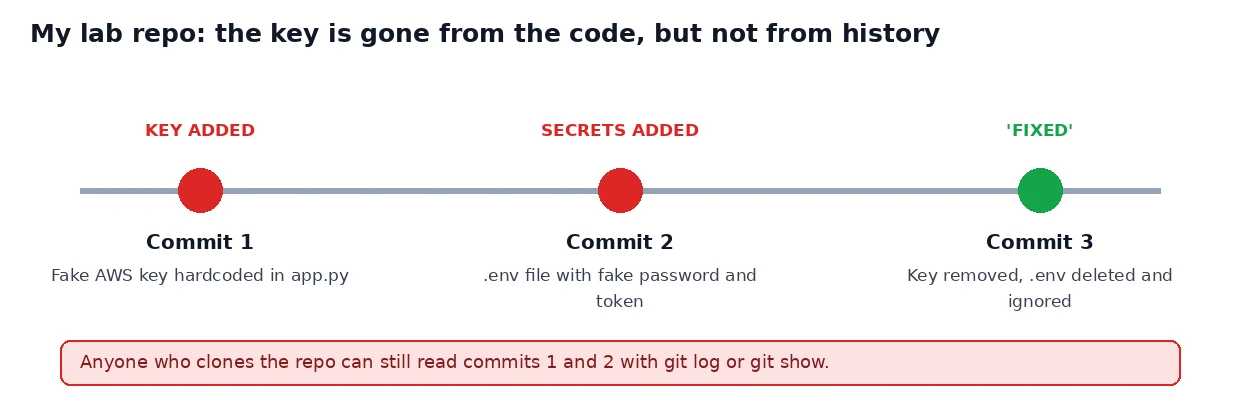
Anyone looking at the current files would see a tidy project. But the first two commits are still in the history, and git show on the first commit prints the key in plain text.
Scanning only today’s files
I ran gitleaks on the current files first, with git history switched off. Result: no leaks found. If I had stopped there, I would have felt fine. This is exactly the false comfort I mentioned at the start.
Scanning the full history
Then I scanned the whole git history. This time gitleaks reported one leak: the AWS access key in the very first commit.
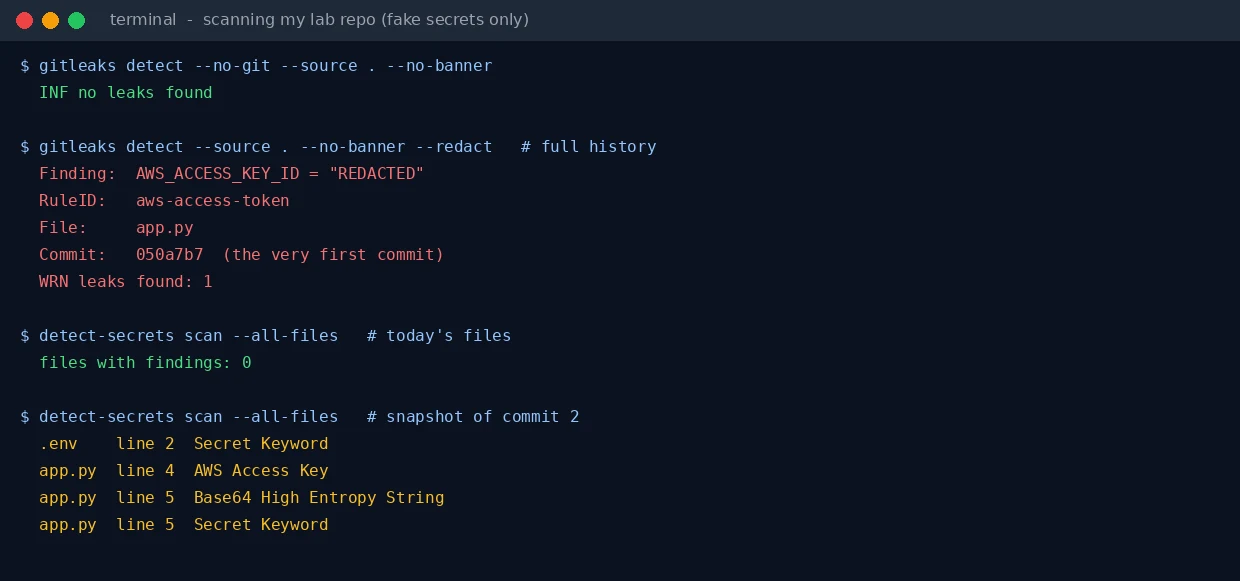
So the same repo was “clean” or “leaking” depending on one setting. The lesson I took away is that a scan of your current files only tells you what is visible today, not what an attacker who clones the repo can read.
What each scanner caught and missed
I planted four fake secrets, and no scanner found all four.
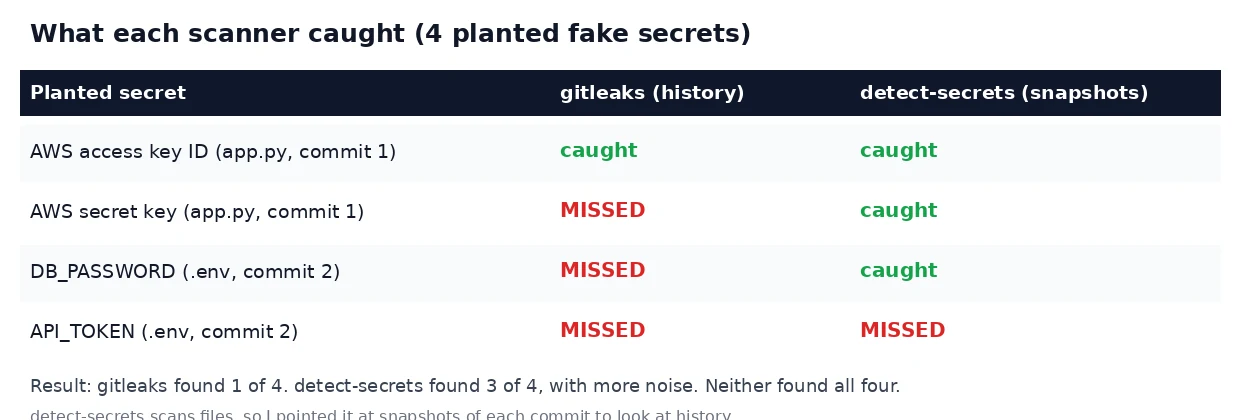
- gitleaks found 1 of 4: the AWS access key ID. It did not flag the secret key sitting on the next line, the database password, or the API token.
- detect-secrets found 3 of 4: the access key, the secret key (twice, under two different rules) and the database password. It missed the API token. It also doesn’t walk git history by itself, so I pointed it at snapshots of each commit to simulate that.
I didn’t expect this. I assumed the well-known AWS pattern would be the easy case and that the generic password and token rules would be the noisy ones. In my lab the specific, well-known pattern was found by both tools, while generic secrets were hit and miss. That fits how these tools work: a rule for a known key format is precise, while generic rules rely on guessing from names and randomness.
I can’t generalise from four fake secrets. My API token was an invented format, and a real token from a popular service might be caught by a dedicated rule. What I can say is that one scanner with default settings is not a safety net, and a “no leaks found” message only means “nothing matched the rules I was running”.
What to do if a real key leaks
If this happens with a real credential, the order matters:
- Revoke or rotate the key first. Do this before anything else. Once a secret has been in a repo, assume someone may have copied it. Deleting it from the code does not take it back.
- Check what the key did. Look at your cloud provider’s activity logs for use you don’t recognise. AWS recommends monitoring access key use with CloudTrail.
- Then clean up the history if you need to, with a history-rewriting tool such as
git filter-repo. This matters for hygiene, but it is not a substitute for step 1, because copies of the old history may already exist. - Find out how it happened and fix that part of the process.
Stopping it before it starts
The cheapest fix is making the mistake hard to repeat:
- Stop using long-term keys where you can. Roles and temporary credentials mean there is no permanent key to leak. I covered a related idea in my IAM least-privilege walkthrough, because a key that leaks but can only touch one folder does far less damage.
- Add a pre-commit scan. Running a scanner before each commit catches the “quick test” mistake before it reaches the repo.
- Scan history, not just files. That’s the lesson from my lab.
- Use two different scanners if you can. Their gaps didn’t overlap in my test.
- Keep secrets out of project folders. Use environment variables or a secrets manager, and keep
.envin.gitignorebefore the first commit, not after. - Turn on your platform’s secret scanning. GitHub’s push protection is on by default for public repositories.
Mistakes I’d avoid
- Trusting a clean scan of today’s files. History is where the old key lives.
- Deleting the key and calling it fixed. Rotate it.
- Relying on one tool with default rules. My own test missed three of four with one scanner.
- Using real credentials to test a scanner. Use obviously fake ones, as I did. Never plant a real key, even in a private repo.
- Treating
.gitignoreas a cleanup tool. It only stops future commits from adding the file. It does nothing about what was already committed. - Ignoring the human reason. People hardcode keys because the safe route is slower. If rotating keys or fetching secrets is painful, they will keep taking the shortcut. The same pattern shows up in how staff paste data into unapproved AI tools.
Where I’m at
The thing I keep coming back to is how ordinary the whole sequence is. Nothing in my lab was clever: a quick test, a forgotten file, a “fix” that left the history behind. And stolen credentials stay popular because they skip the hard part of attacking something. If a key works, the attacker doesn’t need a vulnerability at all, and a leaked one is also the kind of thing that can feed a convincing phishing campaign, as I covered in how attackers use AI to write better phishing.
I’m confident about the habits: rotate first, scan history, don’t trust one tool. I’m less sure how the scanners behave on a large, messy real repository, since mine had three commits. If you try this yourself, use fake secrets in a throwaway repo, run at least two scanners, and compare what they miss.
Want to repeat the experiment? Download setup_lab_repo.sh and scan_commands.txt. The script builds a throwaway repo containing only fake secrets.