Picture a normal Tuesday. Someone in your team has a spreadsheet that will not format properly, a deadline in an hour, and a free AI chatbot open in another tab. They copy the whole sheet, customer names included, paste it in and ask for help. It works. They get their answer in ten seconds, and nobody ever finds out.
That is shadow AI: staff using AI tools that the company never approved, usually with good intentions and often with data they should not be sharing. The short answer to “how do we stop it” is that banning tools rarely works. What works is a clear one-page rule, a few well-tuned DLP rules, and one simple habit. I will walk through all three, including a rule set I tested on fake data and where it failed.
A note on my limits before we start: I have not deployed this in a production DLP product, and nothing here comes from a real company breach. The tests below are a simulation using made-up data. The principles line up with public guidance, but your own tools will use different syntax, so treat this as a starting point.
Why this keeps happening
Nobody pastes a customer list into a chatbot to harm their employer. People do it because the tool is faster than the approved process, and because pasting text into a box does not feel like sending data anywhere.
The best-known public example is Samsung in 2023. Within weeks of allowing staff to use ChatGPT, engineers reportedly pasted internal source code into it while trying to fix bugs, and the company then restricted generative AI tools on its devices and networks. The Register’s coverage of the episode, Samsung puts ChatGPT back in the box, is a good short read. What stands out is not carelessness. It is how ordinary the motive was: people wanted their work to go faster.
OWASP, the open security community, lists sensitive information disclosure as a core risk for applications built on large language models, covering things like personal data, financial details, credentials and confidential business information. You can read their description in OWASP’s guidance on sensitive information disclosure. The principle I take from it for workplaces is simple: once text leaves your control, you cannot reliably pull it back.
Fix 1: A one-page policy people can remember
Most AI policies fail because they are written for lawyers. Nobody reads eight pages before pasting a paragraph. I prefer a single page with three colours.
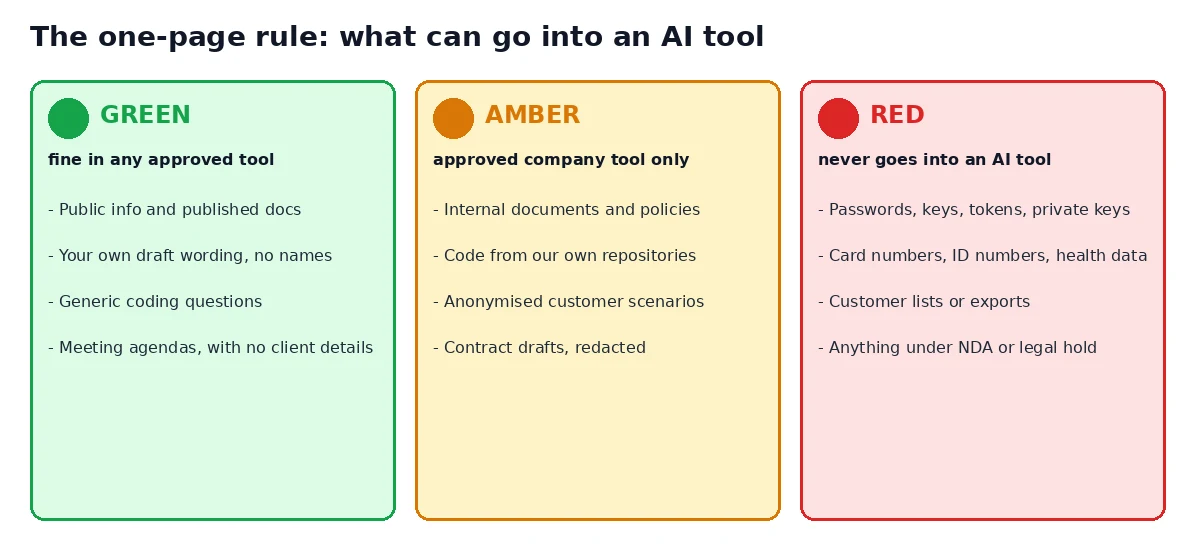
- Green: public information, your own draft wording without names, and generic questions. Fine in any approved tool.
- Amber: internal documents, your own code, anonymised customer scenarios. Approved company tool only.
- Red: passwords, keys, tokens, card numbers, ID numbers, health data, customer lists, anything under NDA. Never goes into an AI tool.
Three things make this work in practice:
- Name the approved tool. A policy that says “do not use unapproved tools” without saying which tool is approved just pushes people back to the free chatbot. If you cannot offer an approved option, expect shadow use.
- Give examples, not categories. “Confidential data” means different things to different people. “A spreadsheet export of customers” does not.
- Say what happens if someone slips. If staff fear punishment, they hide mistakes. If they know a quick report is welcome, you hear about problems while they are still small.
Guidance such as the NIST AI Risk Management Framework treats managing AI risk as ongoing governance, not a one-time ban. A simple, living policy fits that way of thinking.
Fix 2: DLP rules that block the obvious and warn on the grey
A policy tells people what to do. A DLP (data loss prevention) rule is a safety net for the moment they forget. I wanted to see what simple rules can and cannot catch, so I wrote a small Python test harness and ran it against twelve fake prompts. Every secret in the test is a documentation example or a made-up value, not a real credential.
The rules split into two actions:
- Block when the pattern is almost never legitimate: private key blocks, cloud access keys, password or token assignments, valid payment card numbers, and lists of customer IDs.
- Warn when the pattern is common but sometimes fine: several email addresses at once, or text marked “confidential”.
Here are two of the rules, written as plain regular expressions so you can adapt them to whatever your DLP tool uses:
Cloud access key:     \bAKIA[0-9A-Z]{16}\b
Secret assignment:    (?i)\b(api[_-]?key|secret|password|token)\s*[:=]\s*\S{8,}
And here is what the test produced:
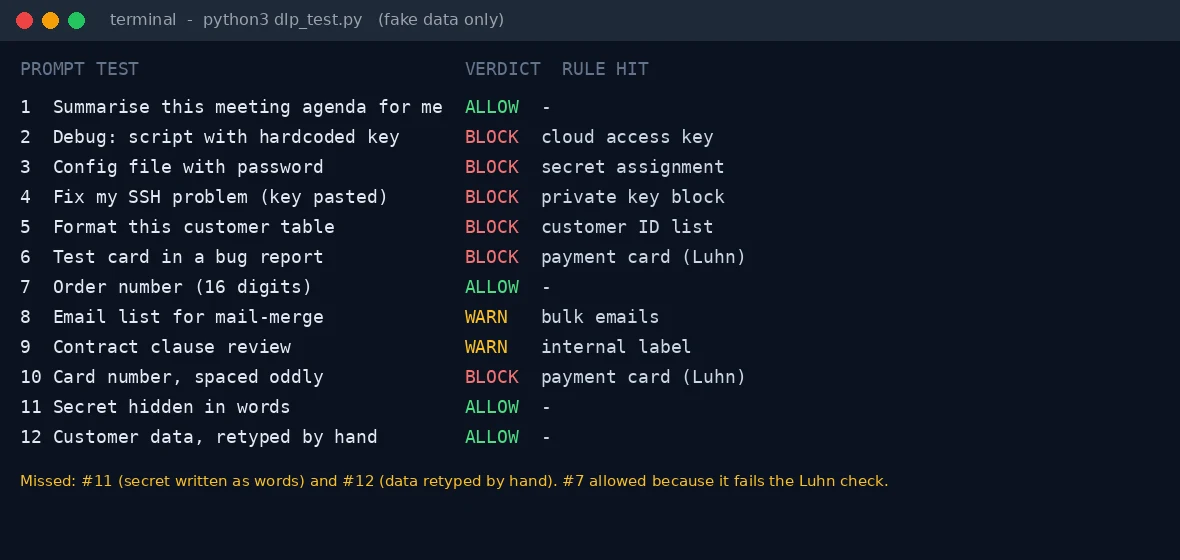
Out of twelve prompts, the rules blocked six, warned on two, correctly allowed two harmless ones (prompts 1 and 7), and missed two. Three results taught me more than the successes did.
Lesson one: add a checksum to card rules
Prompt 7 was a 16-digit order number, and a plain “16 digits” rule would have flagged it as a card. Adding a Luhn check, the checksum all real card numbers pass, let it through while still blocking the test card in prompt 6 and the oddly spaced one in prompt 10. Fewer false alarms matter more than they sound. A rule that cries wolf gets switched off.
Lesson two: rules miss rephrased data
Prompt 11 wrote a password out in words (“the password is Winter2026 followed by an exclamation mark”), and prompt 12 retyped customer IDs as spelled-out digits. Both walked straight through. Pattern matching only catches data that looks like the pattern. A determined or simply creative person can get around it without trying.
Lesson three: warn, do not just block
The mail-merge prompt (8) and the contract clause (9) are the grey cases. Blocking them outright would push people to a personal phone. A warning that says “this looks like internal data, use the approved tool” teaches the policy at the exact moment it matters.
My honest takeaway is that DLP rules are a net, not a wall. They catch the careless paste. They do not catch the clever one, and they do nothing for a photo of a screen taken on a personal phone.
Fix 3: One habit that costs nothing
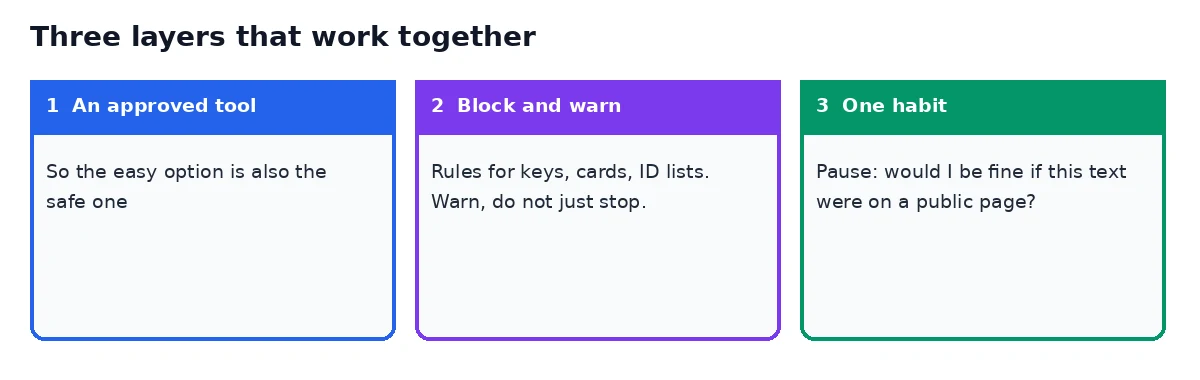
Because tools will always miss something, the most useful control is a habit that fits in one sentence:
“Would I be comfortable if this text appeared on a public web page?”
If the answer is no, it does not go into an unapproved tool. It is easy to remember and needs no training deck. A few follow-ups make it stick:
- Replace names, numbers and company details with placeholders before pasting. “Customer A owes £500” gets you the same help as the real thing.
- Paste the smallest piece that solves the problem, not the whole file.
- Never paste anything from the red list, even into an approved tool, unless the policy explicitly allows it.
Common mistakes I would avoid
- Banning everything. A blanket ban feels safe, but people simply use their phones. You lose visibility and keep the risk.
- Having no approved alternative. If the sanctioned route is slower or missing, people route around it.
- Writing rules that block too much. Noisy rules get disabled, and then you have none.
- Trusting DLP to catch everything. My own test missed two of twelve, and those were easy cases.
- Forgetting personal devices. Rules on the corporate network do not see a phone on mobile data.
- Never reviewing the policy. AI tools change quickly. A policy written once and forgotten goes stale within months.
- Treating it as a staff problem only. When people paste data into a chatbot, the cause is usually a process that is too slow, not a character flaw.
Where I would start on Monday
If I had to improve a workplace’s shadow AI risk in a week, I would do four things:
- Write the one-page green, amber and red policy and name an approved tool.
- Turn on block rules for keys, secrets, valid card numbers and customer ID lists, and warn rules for the grey cases.
- Ask staff, without blame, what they actually use AI for. The answers show you where the approved process is too slow.
- Teach the public-web-page habit in a ten-minute chat, not a long course.
I am sure about one part and unsure about another. I am sure that clear rules plus an approved tool beat a ban. I am less sure how well any rule set holds up against thousands of real, messy prompts, because mine ran on twelve invented ones. If you try something similar, test it on fake data first, keep the rules quiet enough that people do not resent them, and expect to adjust.