Ask someone how to spot a phishing email and you will almost always hear the same advice: look for spelling mistakes and awkward grammar. That advice made sense for years. It is now the easiest way to get fooled.
To show why, I built a phishing email the way a modern attacker would write it and took it apart in a lab. The body reads like a normal message from a busy finance colleague. No typos, no strange phrasing, no broken English. Every real warning sign is hidden in the parts of the email most people never open.
A quick note on the sample before we start: it is a constructed lab email using reserved example domains, not a message from a live campaign. I use a constructed one because it lets me show every technique safely. The key header lines are shown inside this article, so you can compare them with any suspicious email you receive. I have not investigated a live incident in a company, so treat this as lab-based learning, not an incident-response guide.
Why the typo rule stopped working
Older phishing campaigns were often written by people working in a language that was not their own, and they were pushed out from the same few templates. That gave defenders two cheap tells: clumsy language, and thousands of identical messages.
Generative AI weakens both:
- Fluent writing in any language. Translation and grammar are no longer a barrier for the attacker.
- Style imitation. Give a model a few genuine corporate emails and it can copy the tone closely.
- Cheap personalisation. Details from public profiles, such as a job title, a manager’s name or a recent project, can be worked into many slightly different variants, which also makes “same text sent to everyone” detection less useful.
Official sources describe the same shift. The UK’s National Cyber Security Centre assessed that AI will make social engineering and reconnaissance more effective and harder to detect, and singled out social engineering as the area where attackers gain the most; you can read it in the NCSC’s assessment of AI’s impact on the cyber threat. The FBI’s Internet Crime Complaint Center has warned that criminals use AI tools to translate and polish messages, which removes the grammar and spelling errors that might otherwise be warning signs; see the FBI’s public service announcement on generative AI and fraud.
The practical takeaway is simple. AI improves the message. It does not improve the infrastructure. The attacker still needs a sending server, a domain and a link destination, and those leave evidence. That evidence is what we check now.
The sample: a “changed bank details” email
My lab email follows a classic business email compromise pattern. It claims to come from a finance contact at a vendor called Northbridge, says the vendor’s bank details have changed, and asks for confirmation before 5 PM.
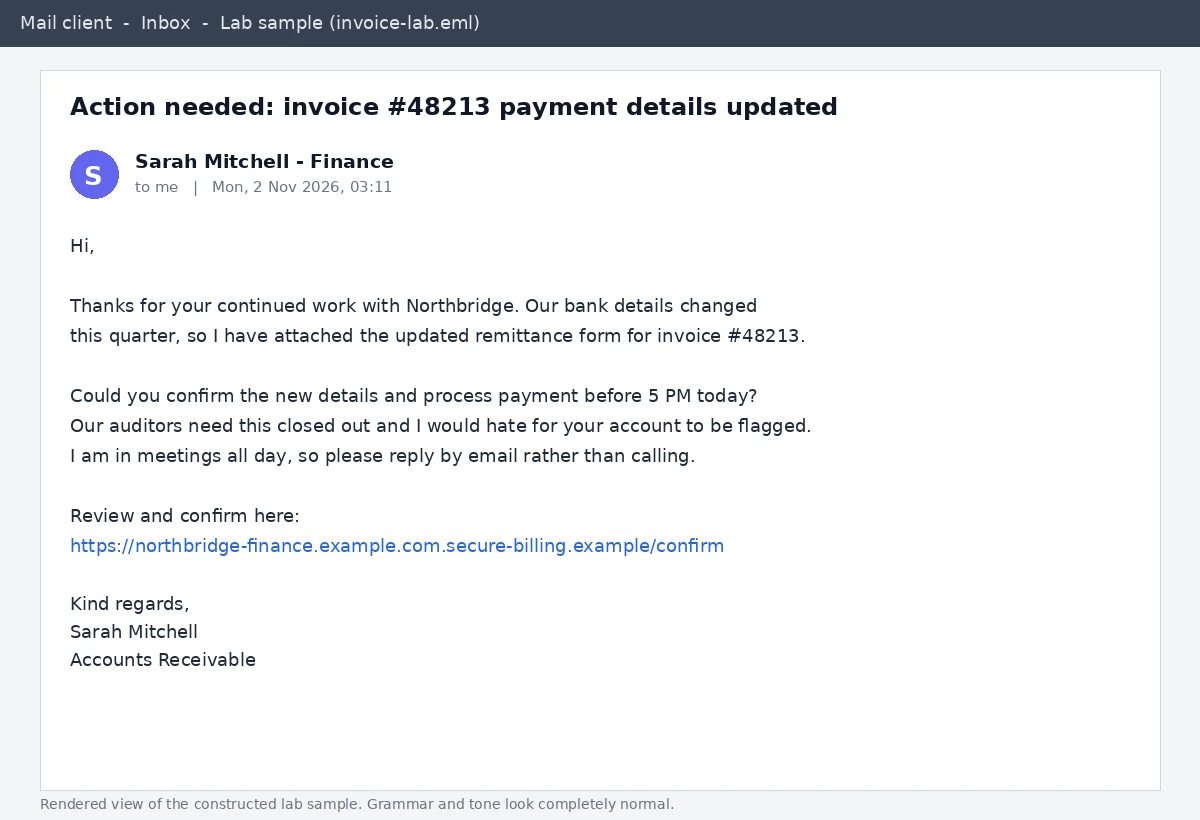
Rendered normally, nothing looks wrong. If you work in accounts payable and you are having a busy Monday, this is the email that gets through. So the first rule is to stop reading the message and start reading the evidence.
Step 1: Read the raw headers
The rendered email shows what the sender wants you to see. The headers show what actually happened.
In Gmail, open the message menu and choose “Show original”. In Outlook, open the message properties. In a lab, open the saved email in a plain text editor.
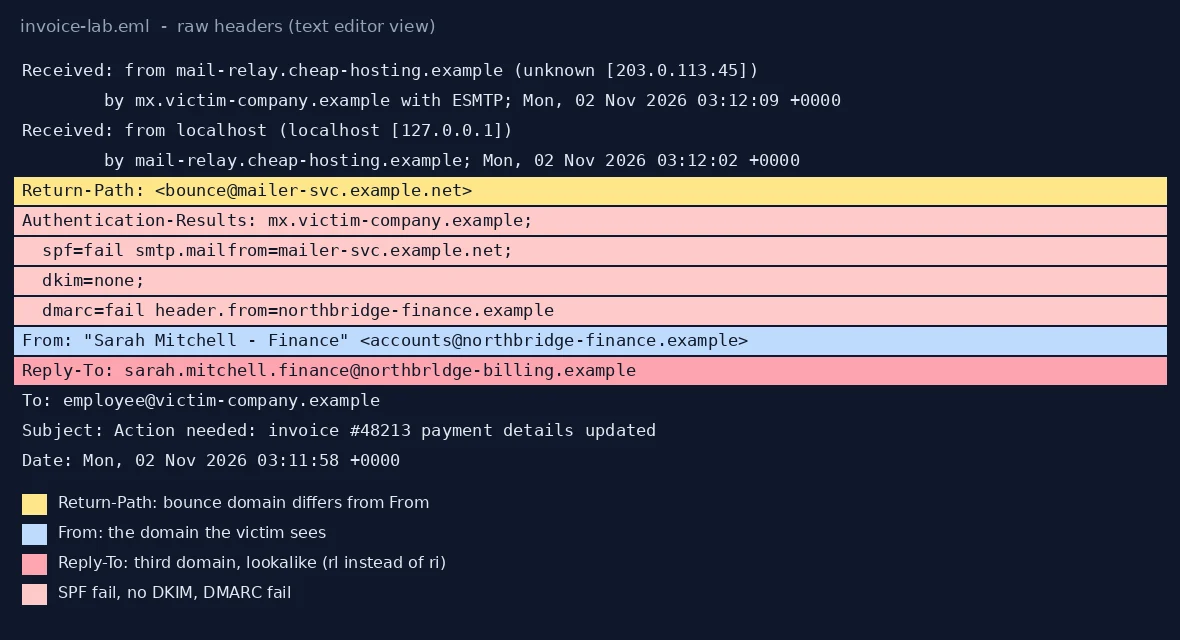
Here are the key header lines from my lab sample, in text form so you can compare them with a suspicious email of your own. Every domain is a reserved example domain, and the address in the first line comes from a range set aside for documentation.
Received: from mail-relay.cheap-hosting.example (unknown [203.0.113.45])
Return-Path: <bounce@mailer-svc.example.net>
Authentication-Results: mx.victim-company.example;
 spf=fail smtp.mailfrom=mailer-svc.example.net;
 dkim=none;
 dmarc=fail header.from=northbridge-finance.example
From: "Sarah Mitchell - Finance" <accounts@northbridge-finance.example>
Reply-To: sarah.mitchell.finance@northbrldge-billing.example
Subject: Action needed: invoice #48213 payment details updated
Here is what I check, in order.
The three-domain mismatch
My sample has three different domains in three places:
From: northbridge-finance.exampleReturn-Path: mailer-svc.example.netReply-To: northbrldge-billing.example
A mismatch on its own is not proof of fraud. Legitimate bulk-mail services often send on a company’s behalf using their own bounce domain. The field that matters most here is Reply-To, because it decides where your answer goes. Hit reply on this message and your words land on a third domain you never saw.
The lookalike
Read the Reply-To domain again: northbrldge. It is “northbridge” with an rl where the ri should be. On a phone, in a hurry, your eye reads the shape of the word and not its letters. Lookalike domains are built for fast readers.
The authentication results
The sample’s headers show three results:
spf=faildkim=nonedmarc=fail
In plain terms: the server that delivered the message is not authorised to send for the claimed domain (SPF), the message carries no cryptographic signature (DKIM), and the domain’s own policy check fails (DMARC). Any one of these can have an innocent explanation. All three together, on a message that claims to come from a finance team and asks for money, is a strong reason to stop.
One caveat that people regularly get wrong: a passing result does not mean an email is safe. An attacker can register their own domain and configure SPF, DKIM and DMARC perfectly for it. Authentication tells you whether a message really came from the domain it claims, not whether that domain deserves your trust. A fail is a warning. A pass is simply the absence of that warning.
The Received chain
Received headers record every server the message passed through. Read them from the bottom up, because the bottom entry is closest to the true origin. In my sample, the first hop is an unnamed relay on a cheap hosting provider at 203.0.113.45, an address from a range reserved for documentation. In a real investigation you would run the actual address through a reputation lookup. The pattern is what matters: a finance department does not normally send mail through an anonymous relay.
Step 2: Read domains one character at a time
An AI model can write a flawless paragraph, but it cannot make a domain belong to a company. That makes domains the most reliable thing to inspect, so read them slowly. I look for:
- Lookalike characters:
rnform,rlforri, a zero for the lettero, a capitalIfor a lowercasel. - Extra words bolted on:
-billing,-secure,-support,-login. - Unusual endings attached to a familiar brand name.
- Subdomain tricks. Look at the link in my sample:
https://northbridge-finance.example.com.secure-billing.example/confirm
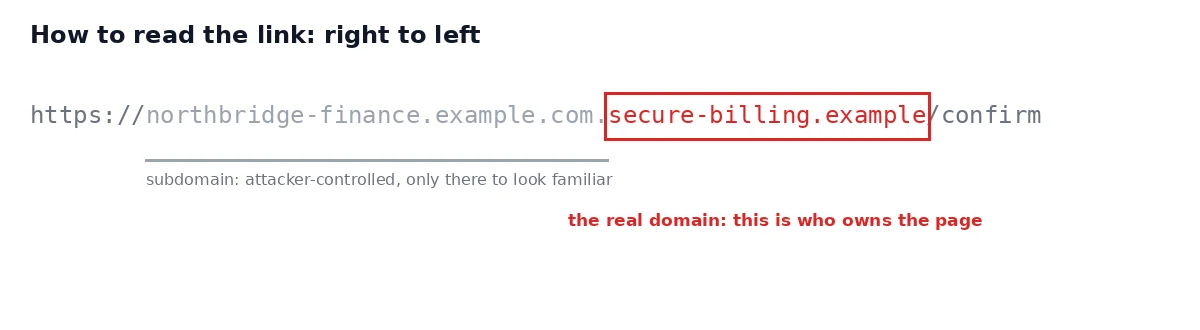
The familiar brand name comes first, and that is what the eye catches. But a domain is read from the right. The real domain is secure-billing.example, and everything to its left is a subdomain the attacker controls purely to look familiar. Reading links right to left is one of the most useful habits you can build.
In a real investigation I would also check how old the domain is. A domain registered a few days ago that claims to be an established company is a strong signal. My sample domains are reserved examples that cannot be looked up, so I cannot demonstrate that step here and I will not pretend to.
Step 3: Hover, do not click
Hover over any link and compare the real destination with the text shown. In a lab, go further and submit suspicious URLs to a scanner, or open them only inside an isolated sandbox. Never test a link like this on your everyday machine, even out of curiosity.
Step 4: Read for pressure, not for typos
Once grammar stops being evidence, the question changes. It is no longer “is this written badly?” It becomes “what does this want me to do, and how fast?”
My sample uses four classic pressure points:
- A deadline: “before 5 PM today.”
- A consequence: “I would hate for your account to be flagged.”
- Blocked verification: “please reply by email rather than calling.”
- A money request: updated bank details.
The third one is the sneakiest. The attacker does not only want speed. They want to prevent the one action that would expose them: calling the real contact on a number you already have.
Any message that combines money, a deadline and “do not verify” deserves suspicion, however polished the writing.
Common mistakes when analysing phishing
These are the traps that catch careful people too:
- Trusting the display name. “Sarah Mitchell - Finance” looks human and professional. Anyone can type anything into that field. The real address and the headers are what count.
- Reading only the From line. In my sample the riskiest domain sits in the Reply-To header, which most people never look at.
- Treating “pass” as “safe”. Passing authentication proves where a message came from, not that the sender is honest.
- Hunting for typos. This is exactly the rule that attackers now beat for free.
- Verifying through the email itself. If the message gives you a phone number or reply address, using it only confirms the attacker’s own setup. Use a contact method you already had.
- Judging on one signal. A single odd header is rarely proof. Real mail is messy, and legitimate messages sometimes fail authentication because of misconfigured senders. It is the combination of mismatched domains, failed checks, a lookalike address and manufactured urgency that tells the story.
A checklist you can reuse
- Open the full headers, not just the rendered message.
- Compare From, Return-Path and Reply-To.
- Check SPF, DKIM and DMARC. Treat a fail as a warning and a pass as neutral.
- Read sender and link domains character by character, and read links right to left.
- Hover over links, or scan them in a sandbox.
- Ask what the email wants and how fast.
- For anything involving money, credentials or files, verify through a channel you already trust.
For plain-language guidance on spotting and reporting phishing, CISA’s Recognize and Report Phishing page is a good one to bookmark and share with family and colleagues.
What happens if someone does click
Even careful people click sometimes, so it helps to know what limits the damage. A phishing email that steals a password is far less useful to an attacker if the account also asks for a second factor, which is why I audited the gaps in MFA coverage. And if the stolen item is a cloud access key and not a password, the same logic applies to how leaked keys end up in repositories. Neither fix replaces spotting the email, but both shrink the damage when you miss one.
Where this leaves us
AI did not invent phishing, and it did not change what phishing needs in order to work. It removed the cheapest warning sign we had. The message can now be perfect. The infrastructure behind it still cannot be.
My limits are worth stating plainly. This is a constructed sample, so it is tidier than real mail, and everything here comes from lab work and public reporting, not from defending a production environment. If you want to practise, build a few samples of your own in a lab, mix in some that pass authentication, and see how your checklist holds up.