Picture an ordinary afternoon. Someone in accounting opens an invoice that looks like the forty others they’ve opened this month. Nothing happens. No warning, no pop-up, no broken screen. And that quiet is exactly why ransomware is so hard to feel coming: the part everyone remembers, the lockout, is the last step of a long chain, and most of the chain is silent.
The short version is that a ransomware attack runs in roughly twelve stages, from getting in to locking files, and you can break it at several of them, not just the last one. To see where, I mapped each stage to MITRE ATT&CK and drew the result. I’ll say up front that I haven’t responded to a real incident. What follows is a map I built and checked, plus what it taught me, so read it as a way of thinking and not as an incident report.
Act one: the click is the least interesting part
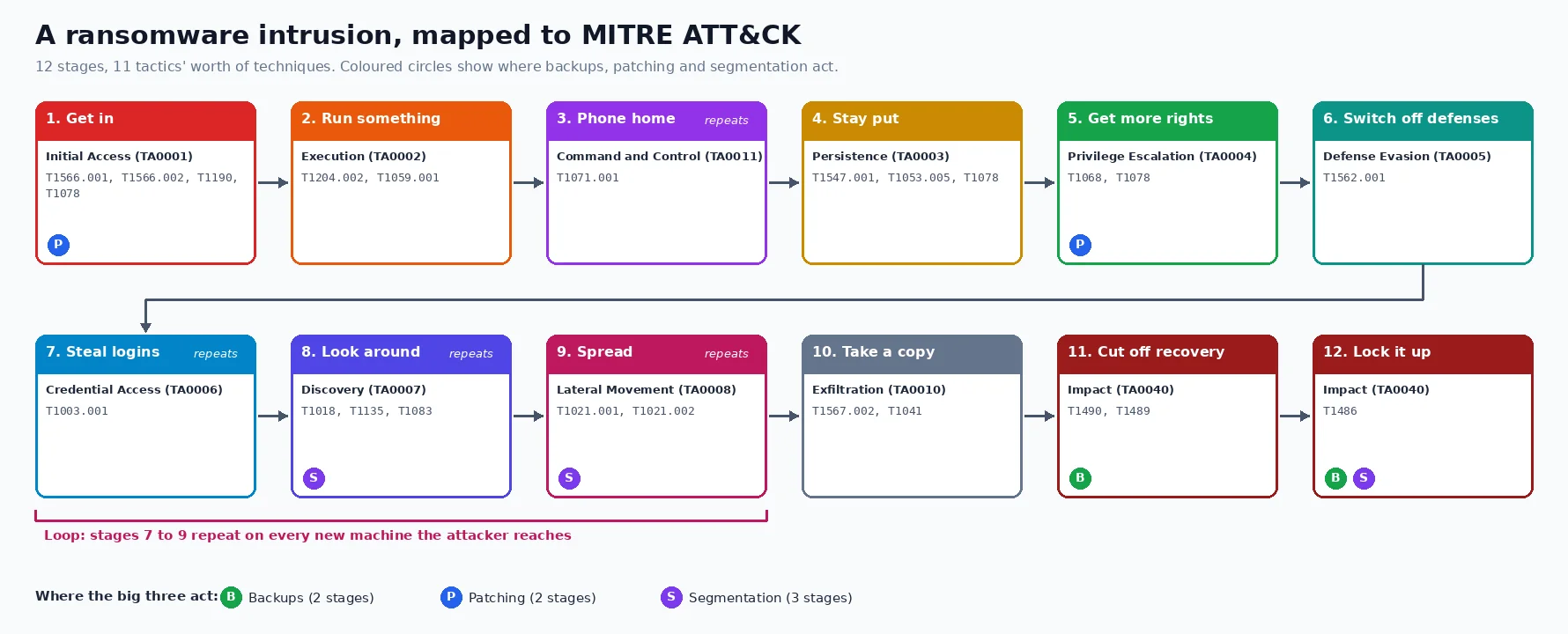
Stages 1 to 3: getting in, running something, phoning home. The way in is usually one of three things: a phishing message (ATT&CK T1566), a public-facing system with a known flaw (T1190), or a login that was already stolen or reused (T1078). The victim runs something, and the new foothold quietly contacts the attacker over ordinary web traffic (T1071.001), which looks a lot like everything else on the network.
What I took from drawing this part is that nobody has to be careless. An attacker only needs one of the three doors, and the door might be a server nobody remembers rather than a person. That’s why patching and email filtering matter, but also why I wouldn’t pin everything on training people to spot bad links.
Act two: the quiet middle, where the real damage is decided
Stages 4 to 9: staying, climbing, hiding, stealing logins, looking around, spreading. This is the longest part of the story and the one most people skip. The attacker makes themselves persistent (T1547.001, T1053.005), works up to higher privileges (T1068), tries to switch off security tools (T1562.001), and goes after saved credentials (T1003.001). Then comes a loop: look around (T1018, T1135, T1083), move to another machine (T1021.001, T1021.002), steal more logins, look around again.
That loop is what most simple diagrams hide. A left-to-right arrow makes an attack look like a conveyor belt. It’s closer to a circle that tightens each time a new machine falls, which is why I drew stages 7 to 9 with a bracket under them. I’m deliberately not quoting how long this phase lasts, because the figures differ a lot between reports and I can’t verify one for you.
I’m also keeping this at the level of what happens, not how. There are no commands or tools in this post. The point is where a defender gets a chance to interrupt.
Act three: the last few steps
Stages 10 to 12: take a copy, cut off recovery, lock it up. Before anything is encrypted, many attackers copy data out (T1567.002, T1041), so they can threaten to publish it. Then they go after the ways you’d recover: shadow copies, backup services, and anything they can stop (T1490, T1489). Only after that does the encryption happen (T1486), and that’s the moment you finally notice.
Two things stand out. First, the lockout is the end, not the start, so “we’d see it immediately” is wrong: by the time you see it, stages 1 to 11 are done. Second, if a copy of your data has already left, restoring from backup fixes your availability problem but not your exposure problem. MITRE’s page on Data Encrypted for Impact and CISA’s #StopRansomware guide both cover this ground in more depth than I can here.
What actually breaks the chain
Here’s where the map earned its keep. For each stage I listed which controls would get in the way, then counted. These are my own judgments, not measured effectiveness, and a real environment will differ.
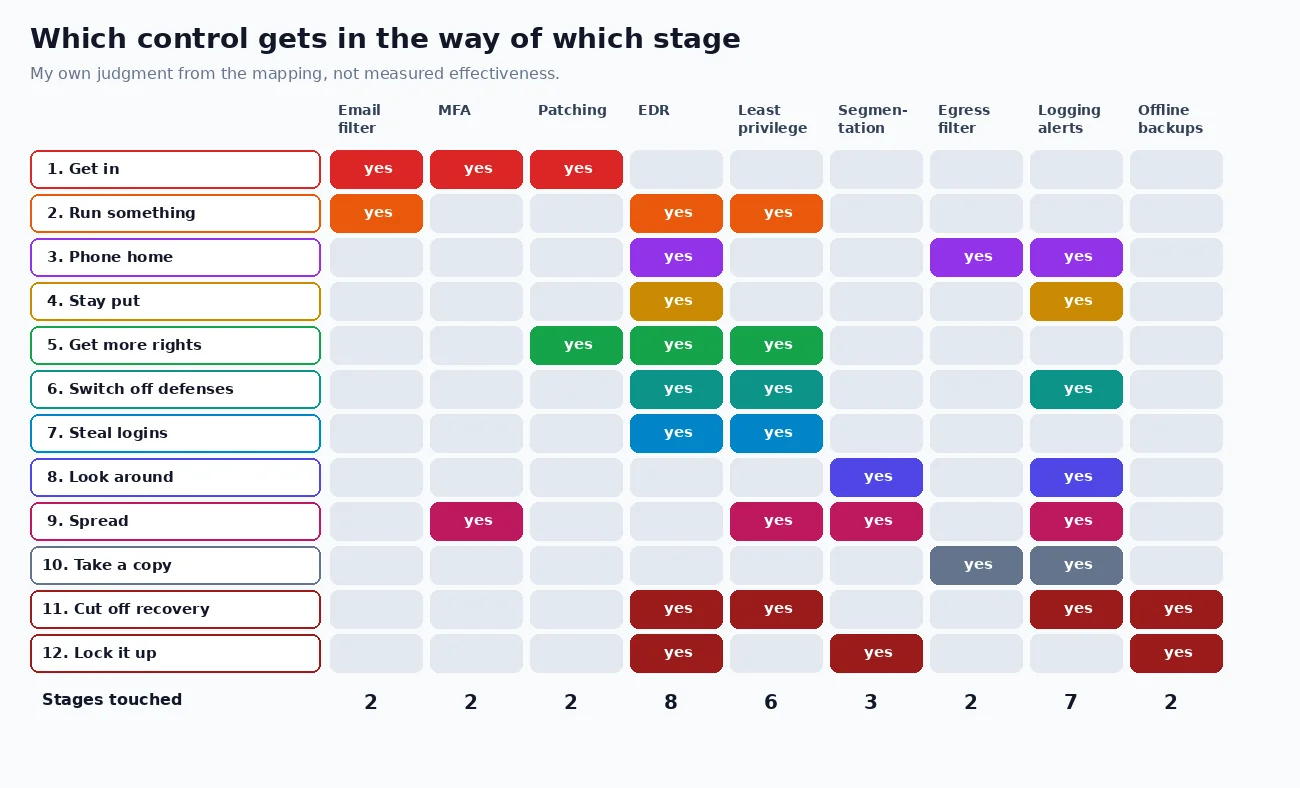
The surprise was how lopsided the counts are. EDR touched eight of twelve stages, logging and alerts seven, least privilege six. Offline backups touched two. If I’d only counted stages, backups would look like the weakest control on the page. But they’re the only one that matters after stage 12, when everything else has failed. That’s a different job, not a smaller one.
So I compared bundles, and ran a little network model on the side:
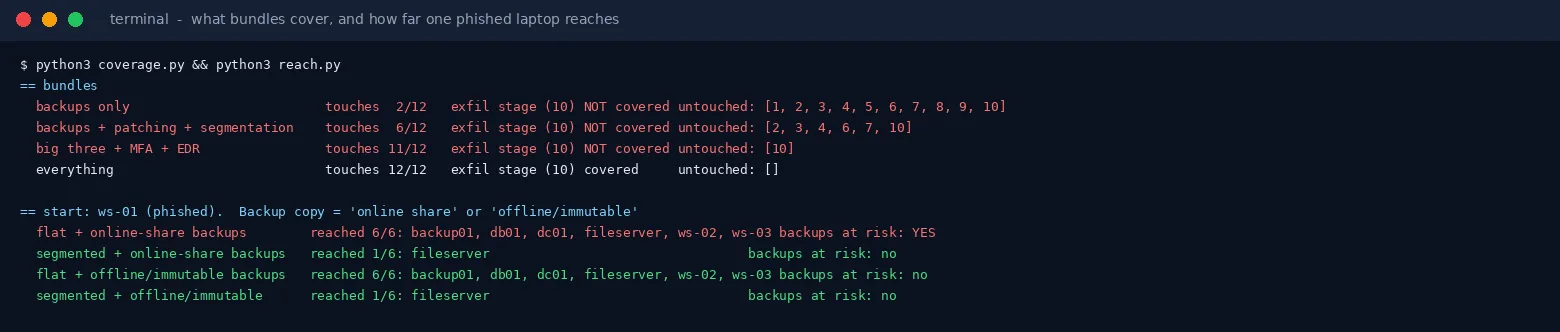
A few things fell out of it:
- Backups only touched 2 of 12 stages. Good for recovery, nothing else.
- Backups, patching and segmentation touched 6 of 12, and still left stage 10, the data theft, uncovered. Egress filtering and alerting are what address that.
- In a flat network, one phished workstation could reach all six other hosts in my model. Segmented, it reached one: the file server.
- That last result matters. Segmentation shrank the blast radius a lot, but the file server was still reachable. It limits the damage; it doesn’t remove it.
- Offline or immutable backups survived even when the whole network was reachable, because their safety didn’t depend on the network at all. Backups on an online share were at risk in the flat network.
My model only looks at network reachability. It ignores credentials, patches, and everything else, so please don’t read “1 of 6” as a promise.
Backups, the way I’d think about them
Keep at least one copy the attacker can’t reach with the same logins they’ve stolen, whether that’s offline or immutable. And test a restore, because a backup you’ve never restored is a hope. The least-privilege thinking in my IAM article applies here too: the account that runs backups shouldn’t be able to delete them.
Patching, segmentation and the other two
Patch the internet-facing systems first, since that’s door number two. Put walls between workstations, servers and the backup system. And don’t forget the identity side: stolen logins are involved at several stages, which I wrote about in Why Stolen Cloud Credentials Beat Software Bugs, and MFA is one of the few controls that touches both the first door and the spreading phase. My MFA audit shows how many places it gets missed.
Where my own diagram went wrong
I made two mistakes building this, and both changed the diagram.
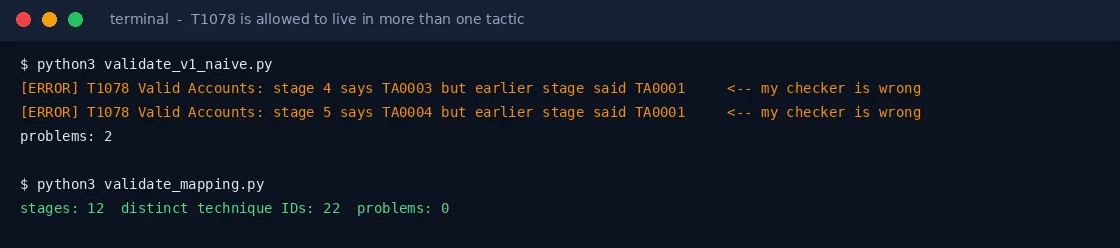
My first checker for the ATT&CK mapping assumed every technique belongs to exactly one tactic. It flagged two “errors” on T1078 (Valid Accounts), which shows up under Initial Access, Persistence and Privilege Escalation in my chain. The checker was wrong, not the map: some techniques legitimately sit under several tactics. I fixed it with a lookup table, and the corrected version passes with 22 technique IDs and no problems.
The second was a layout bug: my first render had the “repeats” tags printed over the tactic names, and stage 11’s title ran out of its box. Small, but a diagram people can’t read isn’t doing its job, so I fixed both before publishing. Also worth saying: ATT&CK gets revised, so check the IDs on attack.mitre.org before you reuse them.
If I only had a week
I haven’t run this on a production network, so this is the order I’d try, not a proven plan:
- Make one backup copy that stolen admin logins can’t touch, then test restoring it.
- Patch anything facing the internet.
- Separate workstations from servers, and servers from backups.
- Turn on MFA for remote access and admin accounts.
- Make sure someone gets an alert on odd logins and odd outbound traffic.
What stayed with me is how much of this chain happens before anybody can see it. If you take one thing from the diagram, take the loop: the middle of the attack is where you have the most chances, and it’s the part most plans skip.
The mapping files, checker, coverage script and network model are in the zip with this post. They run locally, they contain no malware, and they don’t connect to anything.